


Widgetable: Besties & Couples
4.712.27K Reviews
App Specs
- Version
- 4.1.061
- Updated On
- License
- Free
- Downloads
- 50,000,000+
- Developer
- Happeny Technology Pte. Ltd.
- Categories
- Social
- Platform
- Android, iOS
Screenshots

 Analysis by AppCompare
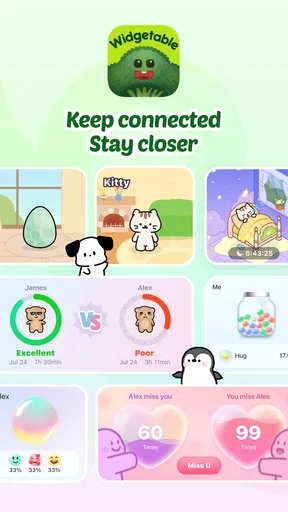
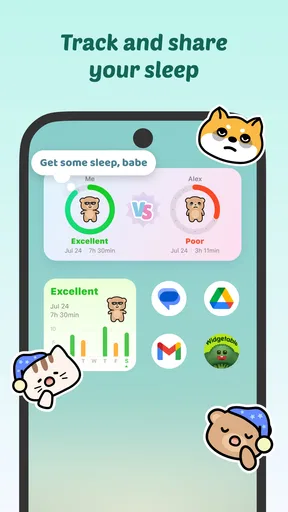
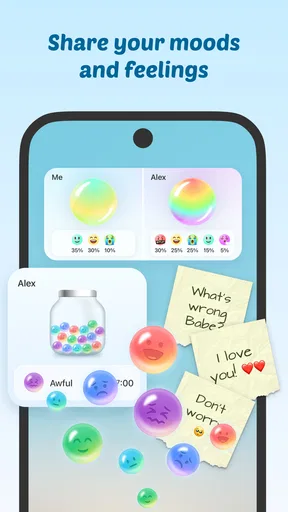
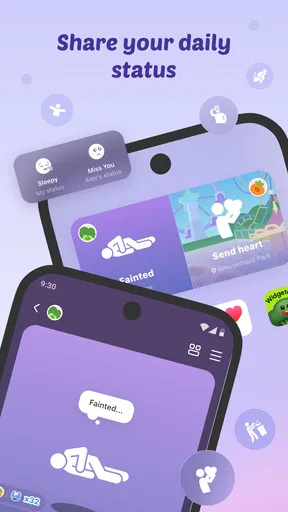
I tend to notice home-screen widgets most when they do something more meaningful than decorate a phone. Widgetable: Besties & Couples is built around that idea: it gives friends and partners small shared ways to keep in touch, including displays for sleep, moods, and everyday updates. I like the premise because it makes connection visible without asking either person to maintain another busy social feed. The key question is whether those little moments feel welcome in your routine or become one more thing to manage.
Small updates that feel personal
Widgetable is a free social app from Happeny Technology Pte. Ltd., and its appeal is more personal than a typical public-facing network. The focus is on sharing selected details with people close to you, rather than posting for a wide audience. That can suit a couple, close friends, or family members who want a gentle sense of one another’s day without needing a full conversation every time.
Readability and navigation in everyday use
The basic idea is easy to grasp: choose a widget, personalize it, and share it with someone. The original customization experience also includes images, colors, and text, so a widget can feel like a small joint project rather than a generic tile. In my view, that low-pressure setup is a real strength for people who are comfortable with phones but do not want to learn a complicated social platform.
Still, a home-screen widget is only useful if its content is readable at a glance. Before settling on a design, I would try it in the place it will actually live, then check whether the text and images remain clear against the chosen background. A design that looks charming while editing may be less practical when seen quickly between messages or while checking the time. Keeping wording short and contrast obvious makes these displays easier to scan.
The app’s social focus can also make the first decisions feel more involved than simply adding a clock. You need to decide what to share, with whom, and which details are worth putting on a shared display. I recommend starting with one widget and one trusted person, then adding more only if the first one proves useful. That keeps setup manageable and helps both people understand what the shared space is for.
Personalization, motor effort, and sensory comfort
Choosing images and text gives people room to make a widget their own, but customization is a trade-off: more choices can mean more tapping and more time spent adjusting small details. If precise touch interactions are tiring, it may help to make a simple design first instead of repeatedly changing colors and layouts. I would also avoid treating decorative elements as essential information; a shared update is most useful when its meaning is clear without careful visual inspection.
The sensory side matters too. A constantly visible mood or sleep update may feel reassuring to one person and intrusive to another. Talk with your friend or partner about what you both want to share before making a widget part of the home screen. For someone who prefers a quieter phone, using only a small number of shared displays can preserve the personal connection without making the screen feel crowded.
Worth Reading Before You Choose

Baby Panda World Brings Quick Play to Modern Phones, but Its Game Library Feels Busy

ESPN’s Live Game View Makes Following Close Games Easier

QuizzLand Review: A Good Fit for Short Trivia Breaks, Not Every Player

Basketball Stars: Multiplayer Is Fast, but Can It Recover When Matches Go Wrong?

WEBTOON Turns Phone Updates Into a Better Reading Routine

Link to Windows Runs on Shared Habits, Not Social Feeds
These choices are especially important when the people sharing a widget have different habits or needs. One person may enjoy frequent check-ins, while the other may prefer to look only when they have a spare moment. Agreeing on a light-touch approach—what the widget is for and what neither person should infer from it—can prevent a playful feature from turning into an expectation to respond immediately.
Situational access: where shared widgets help
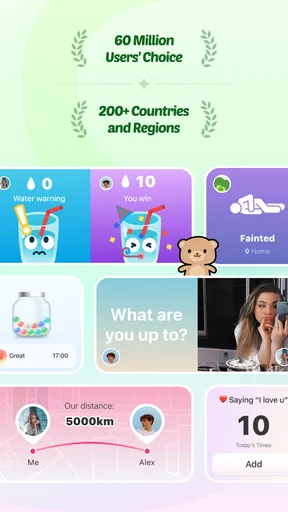
A realistic use is two friends who live in different places and have mismatched schedules. One might glance at a shared mood or sleep display during a break, feel a little more connected, and send a message later when it suits them. That is different from a messaging app, which usually asks the user to open a conversation and decide what to say. Widgetable’s appeal is the small, ambient reminder; it should complement direct conversation, not replace it.
Countdowns can be useful in a similarly specific way. I enjoyed the idea of setting one for a birthday or a trip because it turns a future plan into a shared point of anticipation. To keep it helpful rather than noisy, I would choose an event both people care about and make sure the date is entered carefully. A countdown is a nudge, not a calendar system, so I would still use a calendar for appointments that require reliable planning.
Shared photo albums and polls, described among the app’s interactive options, can add more activity than a simple status display. A poll is best for a low-stakes choice—such as picking between two casual plans—rather than anything that needs a detailed discussion. A photo space can collect moments between visits, but it is worth agreeing on what belongs there so each person feels comfortable contributing.
Widgetable is also a better fit for a brief check-in than for situations where a user cannot comfortably look at a screen. If someone is driving, working with their hands, or trying to focus, the widget can wait. Its value is in making a personal detail easy to find when the phone is already available, not in demanding attention at every moment.
Where it differs from ordinary social apps
Compared with a broad social network, the shared-widget approach feels more intimate and less performative: the point is a small space for selected people, not a stream designed for an audience. Compared with ordinary messaging, it can communicate a tiny piece of context without requiring a fresh text exchange. But if you need searchable conversations, detailed plans, or a dependable record of arrangements, a messaging app or calendar is the better tool.
That distinction helps set realistic expectations. Widgetable is not a substitute for a conversation when someone needs support, and a mood display cannot explain the reason behind a feeling. It works best as a prompt to reach out kindly, not as proof that you know exactly what another person is experiencing. I would treat shared updates as invitations to connect, rather than as complete accounts of someone’s day.
It may not suit people who keep their home screen strictly functional, dislike sharing personal signals, or already find notifications and social apps distracting. Someone who wants a public audience, extensive discussion tools, or a straightforward task planner will likely be better served elsewhere. The app’s strongest use case is narrower: making everyday closeness feel tangible between people who both want that kind of small, shared presence.
Remaining barriers and sensible boundaries
Some friction comes from the nature of shared widgets rather than from any one design choice. Both people need to be interested, and the experience is less meaningful if one person rarely checks the home screen. The initial setup can also take a little patience, particularly if you are deciding on a style and what information feels appropriate to share. Starting with a single, low-pressure feature is a sensible way to find out whether the habit sticks.
There is also a practical limit to how much context a compact display can convey. A short status may be easy to notice but can be misunderstood if it is treated as a full explanation. If something important is unclear, ask directly instead of reading too much into a widget. That small boundary keeps a friendly check-in from becoming a source of unnecessary worry.
It is worth considering cost before building a routine around extra options. The app is free to download, with in-app purchases ranging from $0.99 to $99.99 per item. I would begin with the free experience and decide whether any paid item genuinely improves the way you and your companion use it; there is no reason to spend just to make a simple shared widget feel complete.
The app is rated for Everyone, and its broad audience makes the idea approachable for different ages, but shared personal details still call for judgment. I would help younger users choose trusted contacts and keep the shared content comfortable for everyone involved. A general age rating does not replace a family conversation about privacy, boundaries, or screen habits.
Who will get the most from it
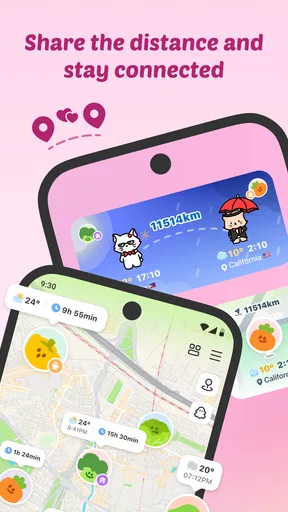
I can see this working especially well for long-distance partners, close friends with busy routines, or family members who enjoy small reminders of one another. The best match is someone who likes personalization and wants connection to be present without turning every check-in into a conversation. If both people agree on what to share, the widgets can become a gentle ritual: a quick glance in the morning, then a message when there is something worth saying.
It is less compelling for a person who prefers one-to-one conversation only, avoids putting personal information on a home screen, or wants every social tool gathered into a single established platform. It is also not the right answer when reliable scheduling or urgent communication matters. In those cases, a calendar, direct call, or familiar messenger offers clearer tools for the job.
Widgetable has a 4.7 average from around 434,000 ratings, and it has been installed over 10 million times. It was released on December 14, 2022, and version 4.0.050 requires Android 9 or later. Those figures suggest that many people are drawn to the shared-widget idea, but they do not guarantee that it will fit every household or relationship; the real test is whether both people enjoy using it after the novelty wears off.
A warm idea with a specific purpose
What makes the app appealing to me is its focus on small, chosen connections. I would recommend trying it with someone who enjoys playful home-screen personalization and understands that a widget is a small signal, not a substitute for listening. Keep the first setup simple, agree on comfortable sharing boundaries, and use a regular calendar or messaging app whenever accuracy or detail matters more than atmosphere.
Overall, Widgetable is a thoughtful option for adding a little shared personality to a phone, especially for people who want to feel close across distance or busy schedules. Its strongest moments are modest: noticing a friend’s update, anticipating a trip together, or having a small reason to check in. If that kind of gentle connection sounds good to you, it is worth exploring; if you value privacy, minimal screens, or practical coordination above all, a more conventional tool will probably serve you better.
Have you ever wanted to spice up your home screen with a bit of personality? Well, let me introduce you to Widgetable: Besties & Couples. This app isn’t just about adding widgets; it’s about adding a dash of fun and connection to your everyday digital life. I’ve been playing around with it, and here’s the scoop.
What Makes It Stand Out?
First off, the whole concept of Widgetable revolves around sharing widgets with your favorite people. Imagine having a little piece of your best friend's world right on your phone! It's not just about aesthetics; it’s about creating a shared experience. You can customize widgets with pictures, notes, and even countdowns to special events, which can be shared with your closest pals or your significant other.
Easy Peasy Customization
The app is super user-friendly. Even if you're not a tech whiz, you’ll find it straightforward to navigate. You start by selecting a widget style, then personalize it with images, colors, and text. The customization options are quite extensive, allowing you to really make each widget your own. Plus, the app continuously updates with new designs, so it never gets stale.
Sharing is Caring
One of the coolest features is the ability to share these personalized widgets directly with your friends or partner. It’s as simple as sending an invite. Once they accept, you can both enjoy the widget on your home screens. It's a fun way to stay connected, especially if you’re in a long-distance relationship or just miss your bestie.
Fun Features to Explore
Beyond basic widgets, there are interactive options like polls and joint photo albums. These features make the app feel almost like a social media platform, but with a focus on intimacy and personalization. It’s a refreshing change from the usual social apps where you’re just one of the crowd.
I particularly enjoyed the countdown feature. Setting up a countdown for a friend’s birthday or an upcoming trip adds a delightful anticipation to the days leading up to the event. Plus, it serves as a handy reminder so nothing slips through the cracks.
Room for Improvement
While Widgetable has plenty to explore, I would have liked more integration with other apps. For instance, syncing with calendars or social media could make the experience even more seamless. Some people might also find the initial setup a tad daunting, but taking it one step at a time makes it easier to settle into.
Overall, if you’re looking to add a personal touch to your phone and keep your loved ones close, even when they’re far away, this app is a lovely choice. It’s not just about widgets; it’s about creating small shared moments in a fun, creative way. Give it a try with someone who enjoys that kind of connection, and you might find it earning a place on your home screen.
Pros
- Customizable widgets enhance personalization.
- User-friendly interface with intuitive navigation.
- Seamless integration with social media platforms.
- Regular updates with new themes and features.
- Minimal battery consumption for continuous use.
Cons
- Limited free features; premium needed for full access.
- Occasional widget syncing issues reported.
- Some users find the UI cluttered.
- Limited support for older device models.
- Customization options can be overwhelming.
FAQs for Widgetable: Besties & Couples
What is Widgetable: Besties & Couples and how does it work?
Widgetable: Besties & Couples is an innovative app designed to enhance your relationship with friends or partners by offering customizable widgets for your home screen. These widgets can display shared memories, messages, or daily inspirations, allowing you to stay connected in a unique and personalized way. Simply download the app, choose a widget style, and start sharing with your loved ones.
Is Widgetable: Besties & Couples free to use?
Yes, Widgetable: Besties & Couples offers a free version with basic features. However, for users seeking enhanced customization options and exclusive designs, there is a premium subscription available. The premium version unlocks additional widget templates and other personalization tools to further enrich your user experience.
How do I set up a widget with my best friend or partner?
Setting up a widget is simple. After downloading the app, both you and your friend or partner need to install it. Then, select a widget style and customize it with your desired content—such as photos, quotes, or shared notes. Once both parties approve the design, the widget can be added to your home screen, keeping you both connected.
What customization options are available in Widgetable: Besties & Couples?
Widgetable: Besties & Couples offers a variety of customization options to tailor the widgets to your preferences. You can choose from different widget sizes, colors, and layouts. Additionally, users can add photos, personalized quotes, and set reminders for special occasions. The premium version offers even more exclusive templates and design choices.
Is my data secure with Widgetable: Besties & Couples?
Yes, Widgetable: Besties & Couples prioritizes user privacy and data security. The app employs encryption to protect your shared content and personal information. Moreover, it complies with standard data protection regulations to ensure your data remains confidential and secure. Always ensure you have the latest version of the app for optimal security features.


